


GAxHub: Gaming Hub & Launcher
4.2324.00 Reviews
App Specs
- Version
- 1.5.1
- Updated On
- License
- Free
- Downloads
- 1,000,000+
- Developer
- MC Tech
- Categories
- Libraries & Demo
- Platform
- Android
Screenshots

 Analysis by AppCompare
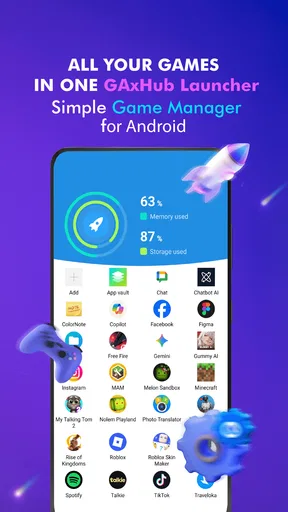
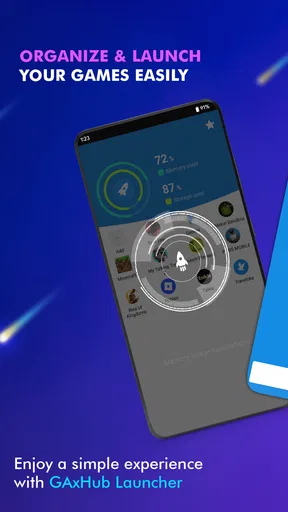
When I want to get into a game quickly, the biggest nuisance is often finding it among everything else on my phone. Gaming Hub: Game Launcher App is built around that small but familiar problem: it gives mobile games a dedicated place, with the aim of making the trip from choosing a title to playing it feel simpler. I see its main appeal less as a dramatic change to gaming and more as a tidier way to manage a phone that has accumulated several games.
What I expect from its speed
A launcher can make games easier to reach, but it is worth separating that convenience from actual game performance. A quicker route to a game does not necessarily make the game itself load faster, and a one-tap optimization option should not be treated as a guarantee against lag. I would use the app to organize a session and try its booster when it seems useful, while judging the game’s performance on the phone and network conditions I already have.
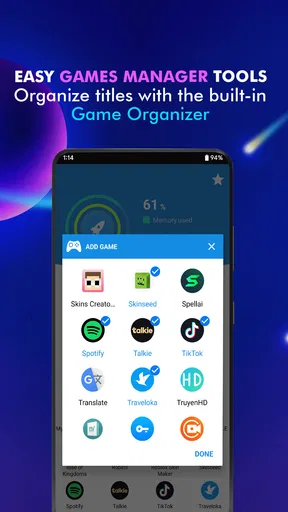
The app’s focus is practical: bring games together rather than make me search through the usual app pages. That can save a little time each time I switch titles, especially if I play in short bursts. Its interface is described as customizable, and sorting games by genre or how often I use them can make a larger collection easier to scan. For me, that kind of small reduction in friction is the most believable speed benefit.
What happens during heavier use
The original appeal of a gaming hub becomes clearer when I move between different kinds of games. I might open a quick puzzle during a break, then return to a longer game later. Keeping those choices in one place makes it easier to pick up the right title without searching across the home screen. If I have many games installed, grouping by genre can be more useful than relying on a single long list; if I mostly play one or two, the extra organization may not matter much.
The app also brings together news and game suggestions. That makes it possible to browse for something new before launching a game, but it creates a trade-off: a hub can become another place to check when I only meant to play. I would treat the news and recommendations as optional browsing rather than part of every session. When I am short on time, going straight to the game is the better workflow.
Reliability and the limits of a booster
The performance booster is one of the app’s more consequential claims, so I would approach it with measured expectations. The published feature description says it can clear RAM and close background apps. That may help in some situations, but closing apps can also interrupt something I wanted to keep running, and it cannot replace a device that is struggling with a demanding game. I would try it before a session if the phone feels busy, then see whether it makes a noticeable difference rather than assuming every stutter has been solved.
There is also a practical question of recovery: after using a tool that closes background activity, I would check any app I rely on for an ongoing task before starting a game. For example, if I was listening to something or waiting for a message, I would make sure it still behaves as expected. That is a sensible habit with any cleanup-style feature, not a reason to avoid the hub outright. The useful lesson is to treat optimization as a choice, not a button that must be pressed before every game.
Worth Reading Before You Choose

Baby Panda World Brings Quick Play to Modern Phones, but Its Game Library Feels Busy

ESPN’s Live Game View Makes Following Close Games Easier

QuizzLand Review: A Good Fit for Short Trivia Breaks, Not Every Player

Basketball Stars: Multiplayer Is Fast, but Can It Recover When Matches Go Wrong?

WEBTOON Turns Phone Updates Into a Better Reading Routine

Link to Windows Runs on Shared Habits, Not Social Feeds
A realistic day-to-day use
Picture a commute or a lunch break when I have only a few minutes free. Instead of swiping through several home-screen pages, I can open the hub, spot the game I want, and start it. If I am in the mood for a different kind of game, sorting by genre can help narrow the choice. Later, when I have more time, I can browse the news area or recommendations and save a new idea for another session. This is where the combination of organization and discovery feels most useful: it supports both a quick launch and a deliberate search without requiring me to reorganize the whole phone.
A less obvious tip is to make the layout reflect how I actually choose games. If I usually return to the same favorites, arranging around frequency of use should reduce decision time. If I rotate between genres depending on my mood, genre grouping is likely more helpful. These are different habits, so I would not assume one arrangement works for everyone. The point is to choose a system that reduces the number of choices I have to scan, rather than spending time making the dashboard look elaborate.
Who will get the most from it?
I can see this being useful for someone who has enough mobile games that the home screen has stopped being a reliable directory. It also suits players who enjoy discovering titles and would rather have recommendations and gaming news near their collection than open separate places to browse. MC Tech’s app sits in the Libraries & Demo space, so I would think of it primarily as a way to gather and navigate games, not as a game in its own right.
On the other hand, if I keep only a couple of games installed and already know where they are, a dedicated launcher may add an extra step rather than remove one. Someone looking for a guaranteed frame-rate increase should also be cautious: the booster is not a substitute for checking a game’s settings, available device resources, or connection. And if I prefer the default launcher’s simplicity, adding another layer of organization may not be worth the change.
How it compares with familiar alternatives
The everyday alternative is simply to keep game icons on the home screen, in a folder, or in the app drawer. That approach is hard to beat for a small collection because it is direct and does not ask me to maintain a separate hub. This app becomes more compelling as the collection grows or when I want a place that combines access with recommendations and news. Compared with a general app folder, its gaming focus is the advantage; compared with opening each game directly, it adds a little browsing and organization in exchange for a more central starting point.
I would not choose it on the assumption that it replaces every other gaming utility. Its role is narrower and more useful when kept that way: organize, launch, browse, and optionally try the available optimization. If my main goal is managing notifications, recording gameplay, or changing device-wide settings, I would look for a tool designed specifically for that job instead of expecting a launcher to cover it.
Device fit and practical expectations
The app is free, rated for Everyone, and supports Android 5.0 or later. Its current version is 1.3.2. Those details make it accessible to many Android users, but the experience still depends on the phone itself: a device with limited available resources may feel different from a newer one, and demanding games can remain demanding regardless of how they are launched. I would leave enough room to judge the hub on organization rather than expecting it to change the capabilities of the hardware.
Its audience response offers some context without settling whether it will suit a particular player: it has a 4.2 average from around 7,700 ratings, with more than 500,000 installs. I read that as evidence that the idea has found an audience, not as a promise that every feature will fit my habits. The most useful test is whether I find myself opening the hub naturally after setting it up, rather than returning to the home screen out of habit.
What’s the Buzz About?
Gaming Hub: Game Launcher App is exactly what it sounds like—a hub for all your mobile games. It organizes your games in a neat and tidy fashion, making them easily accessible without the hassle of scrolling through endless app pages. Whether you’re a casual gamer or a hardcore fan, this app aims to simplify your gaming experience.
Sleek and User-Friendly Interface
Opening the app for the first time, I was greeted by a sleek and intuitive interface. It’s got that minimalist vibe that I really dig—not too cluttered, just the right amount of flair. The navigation is smooth, and you can customize your dashboard to suit your preferences. It even lets you categorize games by genre or usage frequency, which is super handy if you’re juggling multiple games.
Performance Boost, Anyone?
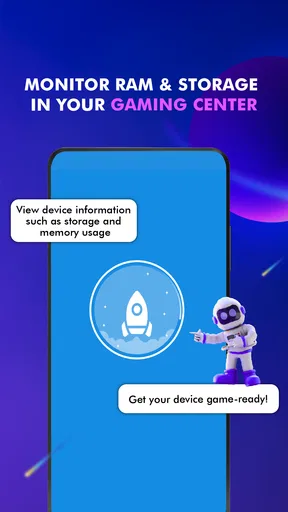
One of the standout features here is the performance booster. We all know how frustrating it is when a game lags at the worst possible moment. Thanks to this feature, you can optimize your phone’s performance with a single tap before diving into a gaming session. It clears up RAM and shuts down background apps, ensuring your games run as smoothly as possible.
Stay Updated with Game News
Another cool thing about this app is the built-in news section. You can stay updated with the latest gaming news, reviews, and updates without having to leave the app. It’s like having your very own gaming news portal. I found myself checking it out more often than I expected, keeping me in the loop with the latest trends and releases.
Game Recommendations at Your Fingertips
If you’re ever in the mood to discover something new, the app’s recommendation feature has got you covered. It suggests games based on your play history and preferences. I stumbled upon a couple of gems I wouldn’t have found otherwise. It’s like having a friend who knows your taste in games.
Wrapping It Up
All in all, it delivers a seamless experience for gamers who want everything in one place. It’s user-friendly, boosts performance, and keeps you updated with the latest gaming news. If you’re looking to streamline your mobile gaming, this app is definitely worth checking out.
So, why not give it a shot? You might just find that it changes the way you game on your phone. Happy gaming!
Pros
- Easy-to-navigate interface.
- Customizable game categories.
- Fast game loading times.
- In-app game news updates.
- Low battery consumption.
Cons
- Limited game library.
- Occasional ad interruptions.
- Requires constant internet.
- No cloud save support.
- Limited parental controls.
FAQs for GAxHub: Gaming Hub & Launcher
What features does the Gaming Hub: Game Launcher App offer?
The Gaming Hub: Game Launcher App provides a centralized platform to organize and launch all your mobile games. It includes features like game categorization, performance boosters, and notifications for updates. Additionally, it offers a customizable interface and tools for managing in-game screenshots and videos, enhancing your overall gaming experience.
Is the Gaming Hub: Game Launcher App compatible with all Android and iOS devices?
The app is designed to be compatible with a wide range of Android and iOS devices. However, some features may vary depending on the device's hardware capabilities and operating system version. It's recommended to check the app store listing for specific compatibility requirements to ensure optimal performance.
Does the Gaming Hub: Game Launcher App improve gaming performance?
Yes, the app includes performance-boosting features such as RAM optimization and background process management. These tools help ensure smoother gameplay by freeing up system resources and minimizing interruptions. However, the extent of performance improvement can vary based on your device's specifications and the games you play.
Is there a cost to download or use the Gaming Hub: Game Launcher App?
The app is free to download and use, providing access to core features. However, there may be optional in-app purchases or premium subscriptions that offer additional features such as advanced customization options and ad-free experiences. Check the app store for detailed pricing information.
How secure is the Gaming Hub: Game Launcher App with personal data?
The Gaming Hub: Game Launcher App prioritizes user privacy and security. It adheres to standard data protection protocols to ensure that your personal information and gaming data are secure. Users are encouraged to review the app's privacy policy for comprehensive details on data handling and security measures.


